


I’ve seen too many .NET projects turn into maintenance nightmares because they skipped proper architecture. Here’s the pattern I use to keep business logic clean, testable, and framework-independent.
The Problem
Most .NET tutorials teach you CRUD operations, but they don’t show you how to structure a real application that:
- Won’t break when you swap ORMs (Entity Framework → Dapper)
- Keeps business rules separate from database concerns
- Makes testing possible without spinning up SQL Server
- Actually scales beyond a todo app
You end up with controllers talking directly to Entity Framework, business logic scattered across layers, and code that’s impossible to test.
Prerequisites
This assumes you’re comfortable with:
- .NET Core 2.2+ (concepts apply to .NET 5+)
- Entity Framework Core basics
- Dependency injection fundamentals
- C# async/await patterns
Time investment: 30-45 minutes to understand the pattern, then it’s your default setup.
The Solution: Three-Layer Architecture
The key is treating your Core business logic as the center of the application—everything else is just infrastructure plugging into it.
Layer Structure
├── ClientWeb/ # UI Layer (Razor Pages, Blazor, whatever)├── Core/ # Business logic, interfaces, models└── Infrastructure/ # Database, logging, external services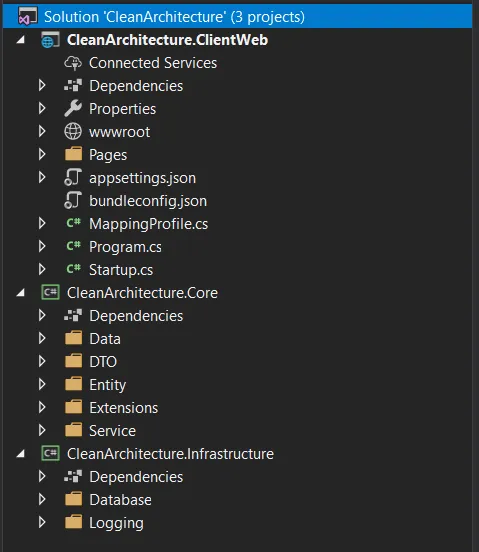
Core owns the interfaces. Infrastructure implements them. This inverts the typical dependency flow.
Core Layer: Business Rules Only
public class ArticleEntity : IEntity{ public int Id { get; set; } public string Title { get; set; } public string Content { get; set; } public DateTime PublishedDate { get; set; }}
// Core/Interfaces/IGenericRepository.cspublic interface IGenericRepository<TEntity> where TEntity : class, IEntity{ Task<IEnumerable<TEntity>> GetAll(); Task<TEntity> GetById(int id); Task Create(TEntity entity); Task Update(int id, TEntity entity); Task Delete(int id);}
// Core/Services/ArticleService.cspublic class ArticleService : IArticleService{ private readonly IGenericRepository<ArticleEntity> _repository;
public ArticleService(IGenericRepository<ArticleEntity> repository) { _repository = repository; }
public async Task<IEnumerable<ArticleDto>> GetPublishedArticles() { var articles = await _repository.GetAll(); return articles .Where(a => a.PublishedDate <= DateTime.UtcNow) .OrderByDescending(a => a.PublishedDate); }}Notice: No database code in Core. Just interfaces and business rules.
Infrastructure Layer: Implementation Details
public class GenericRepository<TEntity> : IGenericRepository<TEntity> where TEntity : class, IEntity{ private readonly ApplicationDbContext _context; private readonly DbSet<TEntity> _dbSet;
public GenericRepository(ApplicationDbContext context) { _context = context; _dbSet = context.Set<TEntity>(); }
public async Task<IEnumerable<TEntity>> GetAll() { return await _dbSet.ToListAsync(); }
public async Task<TEntity> GetById(int id) { return await _dbSet.FindAsync(id); }
public async Task Create(TEntity entity) { await _dbSet.AddAsync(entity); await _context.SaveChangesAsync(); }
// Update and Delete implementations...}Swap Entity Framework for Dapper? Just reimplement IGenericRepository. Your Core layer doesn’t care.

Wiring It Up: Dependency Injection
public void ConfigureServices(IServiceCollection services){ // Infrastructure dependencies services.AddDbContext<ApplicationDbContext>(options => options.UseSqlServer(Configuration.GetConnectionString("DefaultConnection")));
// Repository registration services.AddScoped(typeof(IGenericRepository<>), typeof(GenericRepository<>));
// Service registration services.AddScoped<IArticleService, ArticleService>();
// AutoMapper for DTO conversions services.AddAutoMapper(typeof(Startup));
services.AddRazorPages();}With this setup, your controllers just ask for IArticleService and everything flows.
Using It in Pages/Controllers
public class IndexModel : PageModel{ private readonly IArticleService _articleService;
public IndexModel(IArticleService articleService) { _articleService = articleService; }
public IEnumerable<ArticleDto> Articles { get; set; }
public async Task OnGetAsync() { Articles = await _articleService.GetPublishedArticles(); }}Clean. Testable. No DbContext in your page model.
What I Learned / Gotchas
Generic repositories can be controversial. Some developers say they’re an anti-pattern because Entity Framework’s DbSet<T> already is a repository. That’s true for simple apps, but the abstraction pays off when you:
- Need to swap data sources
- Want to test without EF’s in-memory provider
- Work on teams where not everyone should touch database code
AutoMapper setup is easy to get wrong. Create mapping profiles explicitly:
public class MappingProfile : Profile{ public MappingProfile() { CreateMap<ArticleEntity, ArticleDto>(); CreateMap<ArticleDto, ArticleEntity>(); }}Register in Startup with services.AddAutoMapper(typeof(MappingProfile));
Version note: This was written for .NET Core 2.2. In .NET 6+, use Program.cs instead of Startup.cs, but the architecture principles are identical.
Going Further
This example uses a blog platform (articles, categories, images) instead of a todo app because it’s closer to real-world complexity. Full source code with working migrations is on GitHub.
Want to go deeper?
- Microsoft’s Clean Architecture template (more complex, production-grade)
- Martin Fowler’s “Patterns of Enterprise Application Architecture”
- My .NET dependency injection deep-dive (future post)
Questions? I’m @brandontillman everywhere.