


Historical Post: This article was originally written in 2019. The technology discussed may be outdated or deprecated. Keeping it here for historical reference and to show I’ve been blogging since 2015!
Introduction
This article explores the RadListView component from Telerik’s UI for Xamarin suite. While trial licenses can be restrictive for small projects, an indie developer license option exists. These professional controls offer extensive features without requiring developers to build custom solutions themselves.
RadListView Overview
The Telerik UI for Xamarin RadListView is quite a powerful upgrade from the out of the box list view in Xamarin.Forms.
Key capabilities include:
- Cell customization
- Drag-and-drop reordering
- Sorting and filtering
- Gesture support
- Multiple layout options (list, grid, mixed)
Project Example: Pokemon Search App
The demonstration uses the PokeAPI to create a searchable Pokemon application with image sprites. This API was selected for its abundant data, though the scope was intentionally kept manageable rather than building a complete Pokedex.
Setup Requirements
To access Telerik’s NuGet packages, developers must:
- Register for a Telerik account
- Configure NuGet with the custom feed: https://nuget.telerik.com/nuget
- Add required XML namespaces to XAML files
Implementation Examples
Basic List Layout: The simplest implementation uses an ItemTemplate binding Pokemon data with image and label display.

Grid Layout Enhancement: Adding a ListViewGridLayout definition transforms the interface with minimal code modification, enabling a 2-column grid with configurable spacing.
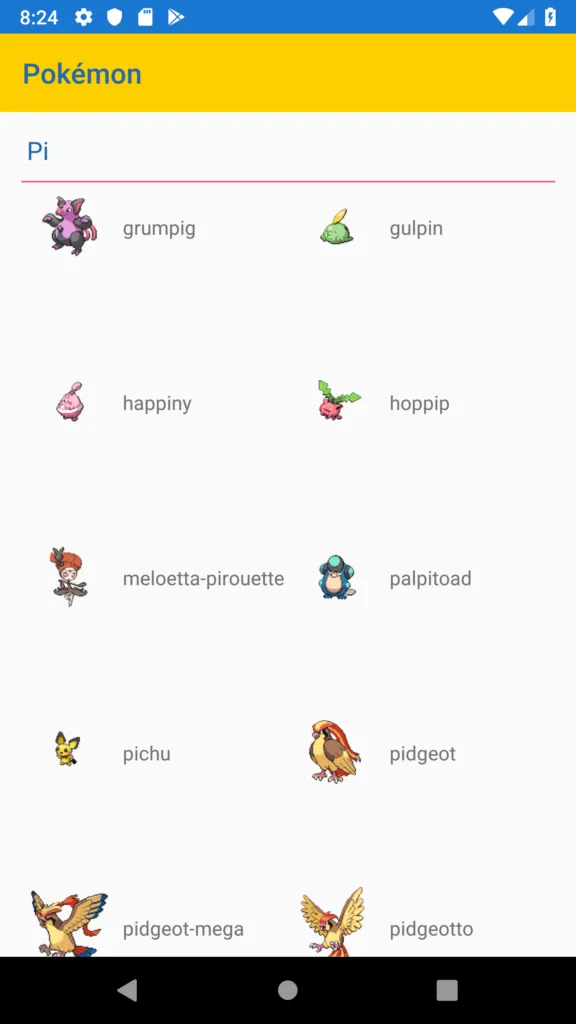
The application successfully loaded 980 Pokemon entries, demonstrating strong performance even on emulators.
Conclusion
Adopting professional control libraries rather than developing custom solutions is recommended. Additional explorations of Telerik’s component suite are planned, and reader feedback on expanding the demonstration is welcome.